Design your architecture with your AI.

Your agent reads the diagram, answers questions, and proposes changes you approve.

Open Merid free to start

Animated demo: a developer asks their agent to notify partners when orders ship. The agent reads the architecture diagram and proposes a Webhooks service with two event edges; the proposed changes appear as dashed ghosts on the canvas, the reviewer steps through them one by one, applies the proposal, and the ghosts become part of the diagram — journaled to the agent.

The diagram answers back

Ask your system anything.

nimbus-commerce6 nodes · 5 edges
charges Storefront FRONTEND API Gateway SERVICE Orders Service SOLE CONSUMER Stripe IF DOWN? Orders DB DATABASE Session Cache DATABASE
would be impacted no path to Stripe answered from 5 edges
you › what breaks if Stripe
goes down?

agent › Only checkout.

Orders Service is Stripe's single
consumer (depends_on · charges) —
new orders can't take payment.

✓ unaffected: browsing, sessions,
reads from the orders DB. Nothing
else touches Stripe.

you › ▋

The answer isn't a guess — it's read off the edges you drew. A diagram in a wiki is a screenshot; this one is a live graph, so "what breaks", "who calls this", and "where do we touch PII" are queries, not archaeology.

Render · the picture, in the conversation

See the diagram without leaving the chat.

you › show me how checkout hangs together ⚙ render_sheet(nimbus-commerce)
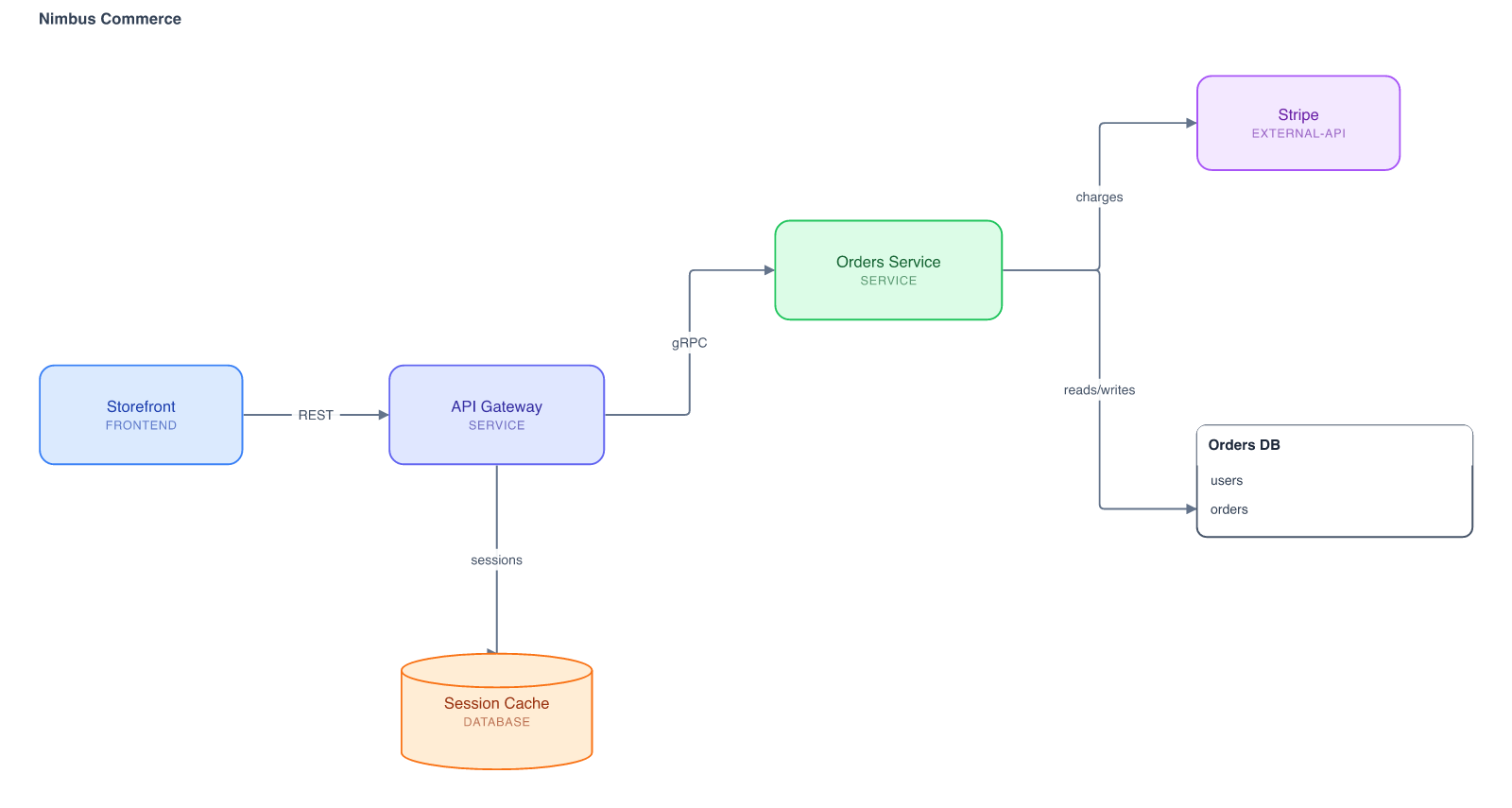
The Nimbus Commerce architecture sheet rendered as an image inside the chat: Storefront connects to API Gateway, which fans out to Orders Service and a session cache; Orders Service charges Stripe and reads and writes the orders database.
nimbus-commerce · 6 nodes · 5 edges · drawn from the live graph
agent › Storefront hits the API Gateway, which fans out to Orders Service and the session cache. Orders Service owns the Stripe call and reads/writes the orders DB.

Your agent doesn’t describe the diagram — it draws it. The sheet renders from the same graph the canvas draws, at the positions you laid out, so what lands in the thread is the real diagram, not an ASCII sketch. Ask what changed, get the picture back — no tab-switch to see what you already drew.

Inline images work the same either way — the local MCP server (Claude Code, Claude Desktop) and the hosted connector both send the sheet back as a PNG.

Review · a pull request, for architecture

See exactly what you're approving.

Your agent proposes; you approve. Additions arrive as ghosts at their proposed position, removals fade in place, edits show field-level before/after — walk the changes one by one, flip to the finished result, then apply the whole batch atomically. Every change lands journaled: who, what, and why.

MCP · one connection, the whole system

Your agent sees the end-to-end picture.

$ claude mcp add --transport http merid \ https://app.usemerid.com/mcp ✓ merid connected · 12 tools Works with Claude Code, Claude Desktop, and any MCP-compatible agent.
you › add a refunds flow to checkout ⚙ get_graph(nimbus-commerce) → 6 services ⚙ get_graph(commerce-schema) → orders, users… ⚙ propose_changes(…) + Refunds Service → Stripe · refunds API + refunds table · FK → orders.id + order_status: "refunded" agent › Proposed — services and schema in one change. Review it in Merid.
1Connect once from your terminal 2Approve in the browser — no tokens to copy 3Every project you can open, it can too

An agent in your repo sees one repo. Connected to Merid, it reads the system you actually run — every service, table, and relationship — before it writes a line. That's context no codebase can give it.

Why Merid

What that gets you.

01

Your AI knows your architecture

“What talks to the orders DB?” Ask in plain language and get answers grounded in the diagram — onboarding and incident triage stop depending on whoever drew it.

02

Reviews that don’t wait on you

Reviewers comment on shapes. Your AI replies with context, attaches a fix proposal to the thread, and flags you only when a question needs the author.

03

AI edits arrive like pull requests

Your agent proposes the diagram update — you apply or reject in one click. Nothing lands without you; everything can be reverted.

04

Architecture and database design together

Services on one sheet; tables, foreign keys, and enums on another — linked into the same diagram, reviewed in the same loop.

05

Works with the AI you already use

Claude Code, Claude Desktop, or any MCP-compatible agent connects with one config entry. No export step, no lock-in.

Pricing

Free to start. Pay when it sticks.

Free
$0
  • Unlimited personal projects & sheets
  • Unlimited viewers, commenters & share links
  • 1 project shared with editors
  • Full AI loop — agent access, proposals, reviews
  • Architecture + database schema sheets
Start free
For teams Pro
$12 / month
  • Up to 10 projects shared with editors
  • Unlimited editors on every shared project
  • One flat price per account — no seat counting
  • Everything in Free
  • Viewers & reviewers stay free — always
  • Priority support
Start free, upgrade in app

One flat subscription per account — $12/month covers every editor you invite, on up to 10 shared projects. We charge the people who build diagrams, never the people who review them: viewers, commenters and share links are free on every plan.

Your architecture changes every sprint. Now the diagram keeps up.

Open Merid